
Adding and selling a digital product
Every field on the product page: details, image, files and status, and how buyers receive their files safely.
A digital product is files a buyer downloads after paying: a PDF book, Excel or Canva templates, designs, code, audio or video files, or a ZIP file. This page explains the whole product page, and most of its sections are shared with the other types.
Who can add a product?
The platform owner, admins and anyone with permission to manage products. Others can only view it. Published products: Free 5, Pro 50, Business Unlimited.
Steps
- Open Products. Under New product, write the Product name and Price in US dollars, choose Digital product, then select Create product.
- Under Product details, complete the description and link, and select Save details.
- Under Product image, select Upload image.
- Under Product files, select Upload files.
- Under Product status, select Publish product.
Product details
- Product name: 2 to 120 characters.
- Short description: one line shown on the product card, up to 200 characters.
- Full description: up to 10,000 characters. Say what the buyer gets, who it's for and what they can do after. It accepts simple formatting (
**bold**,-for lists, and links). - Price in US dollars: enter 0 for a free product. The maximum is $10,000. Buyers see the price in their currency and pay in Egyptian pounds through Kashier. Prices by country.
- Product link: the last part of its page address, like
yarbah.com/your-platform/excel-templates. Lowercase English letters, digits and hyphens.
Product image
Shown on the product card, the product page and when its link is shared. Best at 1600 × 1200 px (4:3), as JPG, PNG or WebP, up to 3 MB. Keep the title and key elements in the middle, as some templates crop the top and bottom.
Product files
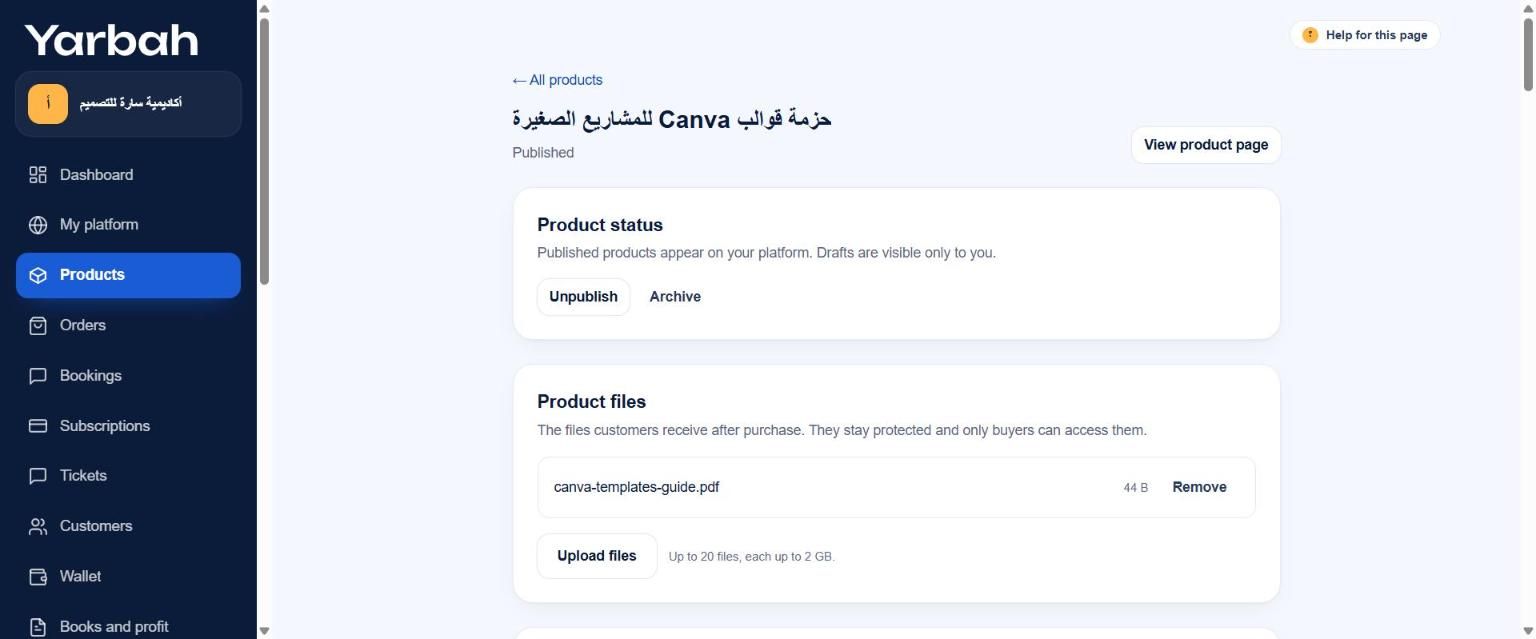
- Up to 20 files per product, and one file's size by plan: Free 500 MB, Pro 2 GB, Business 2 GB.
- Storage for all files: Free 2 GB, Pro 50 GB, Business 250 GB.
- Any file type is accepted. For many files, put them in one ZIP file.
- If an upload stops, the file shows Upload incomplete. Remove it and upload again.
Product status
- Draft: visible only to you. Every new product starts as a draft.
- Published: shown on your platform and can be bought.
- Archived: hidden from your platform; past buyers keep their files.
Unpublish turns the product back into a draft. A digital product can't be published without a ready file, unless its delivery method is License code or Service by your team.
Delivery method
The Delivery method section under the product status sets how the product reaches the buyer after payment:
- Instant download: the files are in My library at once. You can set a download limit, an access period and instructions.
- License code: each buyer gets a code from your ready licence codes.
- Service by your team: the buyer fills in their details, and your team does the work and delivers it from the order page.
Details in Delivery methods for digital products.
Other sections on the product page
- Selling options: pay what you want, limited quantity, pre-orders, installments and licence keys.
- Versions: different prices for the same product.
- Updates to buyers: tell buyers about a new version.
- Prices by country, the marketplace listing and the checkout add-on offer are explained in the selling and marketing part.
What happens after a purchase?
- Yarbah confirms the payment with Kashier directly (a buyer returning from the payment page isn't enough).
- The buyer gets an email receipt and a link to My library.
- They download their files from My library on any device with the same email, within the download limit and access period if you set them.
- The amount is recorded in your wallet and becomes available to withdraw after the holding period (14 business days).
Messages you may see
- A published product needs at least one ready file.
- You reached your plan's limit of published products. Upgrade, or unpublish another product.
- Your plan's file storage is full. Upgrade, or delete files you no longer need.
- You have reached the maximum number of files for this product.
- You already have a product with this link.
- The price is above the allowed limit ($10,000).
- Allowed formats: PNG, JPG and WebP.
FAQs about this page
Updated 19 November 2026