
Discount coupons
Create a percentage or fixed-amount coupon, for all products or some, with start and end dates and usage limits, and share it in a ready link.
A coupon is a code buyers type at checkout to get a discount, such as RAMADAN20. Use it for seasons, for one campaign's audience, or to reward your customers.
Who can use it?
Available on: Pro and Business. The platform owner and admins manage it (the marketing permission).
How do I create a coupon?
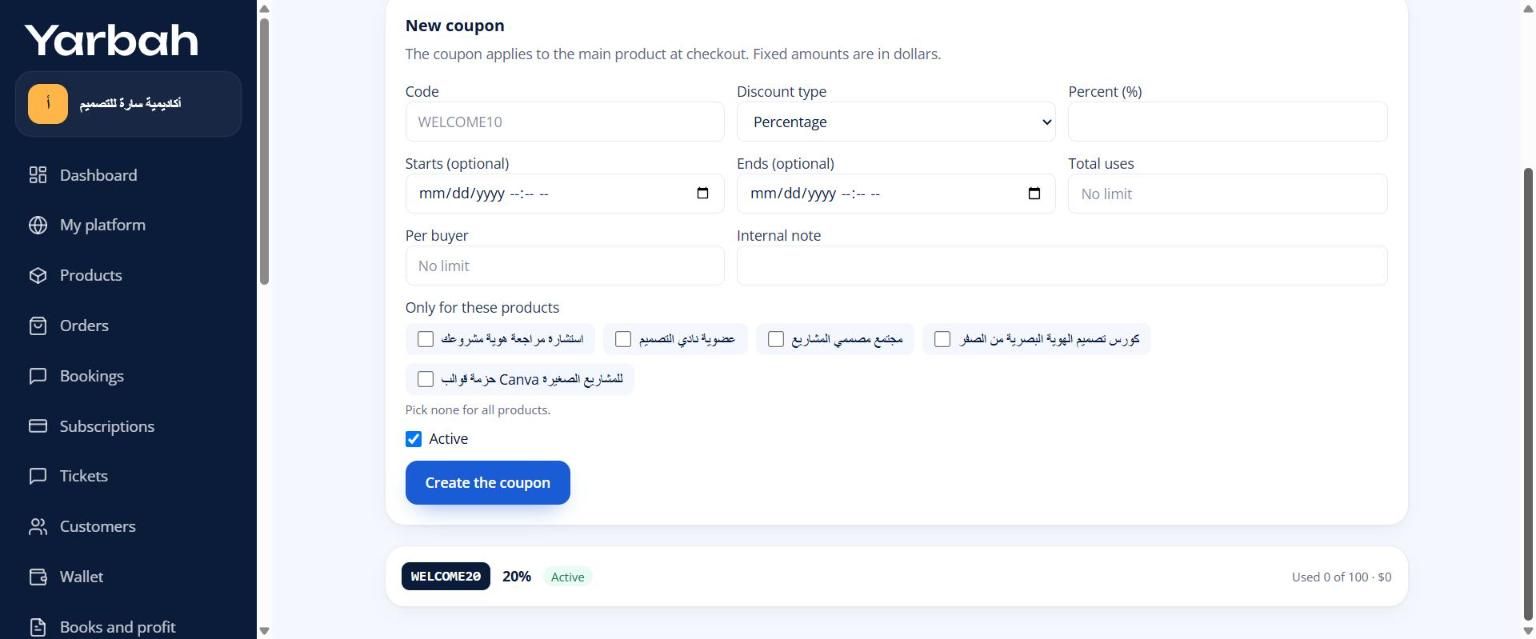
- In the side menu open Sales tools, then the Coupons tab.
- Under New coupon, write the Code: 3 to 30 English letters and digits.
- Pick the Discount type:
- Percentage: write the Percent (%), 0.01 to 100.
- Fixed amount: write the Amount ($) in dollars. Buyers see it in their currency.
- Optional: Starts and Ends.
- Optional: Total uses and Per buyer. Leave them at No limit if you like.
- Optional: Only for these products. Pick none for all products.
- Optional: an Internal note for you and your team, such as the campaign name.
- Select Create the coupon.
How do buyers use it?
- They select Have a coupon? at checkout, type the code, then Apply. The discount shows before paying.
- Or you share a link with the coupon in it, and it applies by itself. Add
?coupon=CODEto the product link, like:
yarbah.com/your-platform/excel-templates?coupon=RAMADAN20Good to know
- The coupon applies to the main product in the order, not to the order bump.
- Yarbah's fee is counted on what the buyer paid after the discount, and the discount comes from the platform owner's share.
- A coupon use is held with the order and released if payment doesn't complete.
- You can stop a coupon any time by unticking Active and selecting Save. Its state shows as Active, Off or Ended, with its uses, like "Used 12 of 50".
- You can add a coupon to abandoned checkout reminders.
Messages you may see
- Another coupon uses this code.
- Check the coupon: the code is 3 to 30 English letters and digits, and the discount is 0.01% to 100% or an amount above zero.
- The coupon is not valid. (for buyers: the code is wrong, ended, used up, or not for this product)
Updated 19 November 2026
Was this article helpful?