
Product types: what can you sell?
Six types: digital product, course, bundle, membership, community and booked session, when to pick each one, and each plan's limits.
When you create a product, you pick its type under What are you selling?. The type is per product, not per platform: one platform holds every type together, within your plan.
The six types
| Type | What the buyer gets | Guide |
|---|---|---|
| Digital product | Files to download: e-books, templates, designs, code, or a ready licence code. | Adding a digital product |
| Course | Lessons in modules with video, quizzes, assignments and a certificate. | Building a course |
| Bundle | Several products and courses together for one price. | Bundles |
| Membership | A monthly, yearly or lifetime membership that opens your products, courses and community. | Memberships |
| Community | Discussion spaces, posts, events, points and levels. | Communities |
| Booked session | A session or consultation booked from your available times. | Bookings |
How do I choose?
- You sell a ready file downloaded once → Digital product.
- You teach in stages and want to follow each student's progress → Course.
- You have several products and want a combined offer → Bundle.
- You want recurring monthly income → a Membership that includes your courses or community.
- You want a place where your audience talks → a Community, sold on its own or inside a membership.
- You sell your time: a consultation or one-to-one coaching → Booked session.
Plan limits
| Free | Pro | Business | |
|---|---|---|---|
| Published products | 5 | 50 | Unlimited |
| Published courses | 1 | 10 | Unlimited |
| Communities | 0 | 1 | 5 |
| Storage | 2 GB | 50 GB | 250 GB |
| Size of one file | 500 MB | 2 GB | 2 GB |
Bundles are available on: Pro and Business.
How do I create a product?
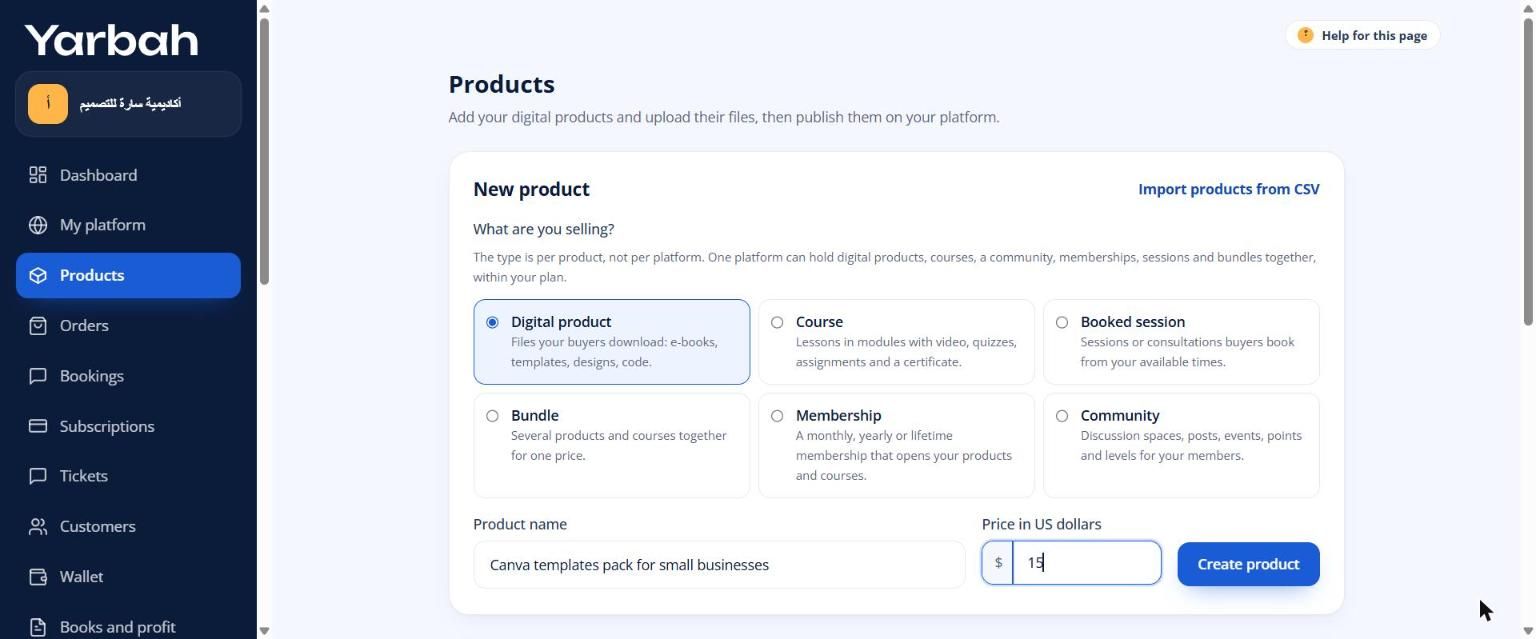
- In the side menu open Products.
- Under New product, write the Product name and the Price in US dollars (0 for a free product).
- Pick the type under What are you selling?.
- Select Create product. The product page opens so you can finish its details and publish it.
If your products are on another platform, use Import products from CSV.
FAQs about this page
Updated 19 November 2026
Was this article helpful?