
Affiliates
Affiliates share your products with their own links and earn a share of your earnings on each sale; when commissions count and get paid, and how you promote others.
An affiliate program gets your audience and partners selling for you: each affiliate has their own link, and every sale from it earns them a share of your earnings. You pay nothing unless a sale happens.
Who can use it?
- Running a program for your platform: available on: Pro and Business, for the owner and admins.
- Promoting other platforms: anyone with a platform on Yarbah (even Free), because commissions reach their platform's wallet.
How do I start the program?
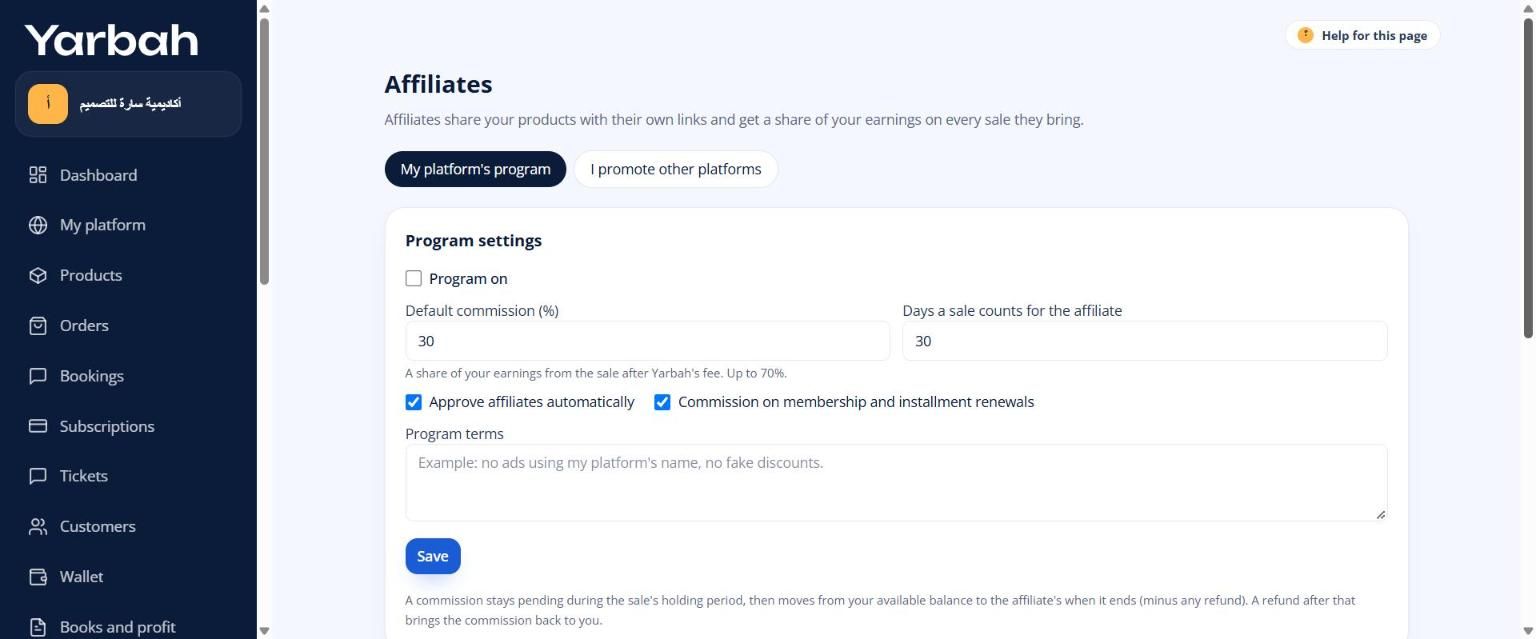
- In the side menu open Affiliates → the My platform's program tab.
- Under Program settings, turn on Program on.
- Write the Default commission (%). It's a share of your earnings from the sale after Yarbah's fee; the maximum shows next to the field.
- Write the Days a sale counts for the affiliate: how many days after visiting the link a sale is credited to them.
- Choose Approve affiliates automatically, or leave it off to review each request yourself.
- Optional: Commission on membership and installment renewals.
- Write the Program terms, like "No ads using my platform's name, and no fake discounts".
- Select Save, then copy the Link to join your program and share it.
Commission per product
Under Commission per product, choose for each product: Default commission, a Custom commission at a different rate, or No commission.
Managing affiliates
Under Affiliates you see each affiliate's visits, sales and commissions, and their state: Waiting for approval, Approved, Rejected or Suspended. You can approve or suspend them, give a Custom rate %, and write a Note.
Affiliates see only how their links perform, never buyers' details.
When does a commission count and get paid?
- A buyer visits the affiliate's link, accepts cookies, then buys within the counting days.
- The commission shows as Pending (holding period) during the sale's holding period.
- When it ends, it becomes Earned and moves from your available balance to the affiliate's wallet, minus any refund.
- If the sale is refunded before then, it becomes Cancelled (refund). A refund after that brings the commission back to you.
The commission comes out of your share and doesn't change Yarbah's fee.
Affiliate links
The general link to your platform looks like yarbah.com/r/your-platform/CODE. For one product, the affiliate adds ?p= and the product's link.
I want to promote another platform
- Open the join link the platform owner sent you, and select Join the program.
- If you have no platform, create one for free: commissions reach its wallet.
- Once approved, open Affiliates → I promote other platforms: your links, visits, sales and commissions.
- Earned commissions appear in your Wallet and are withdrawn like sales earnings, after identity verification.
Messages you may see
- Check the values: rate and tracking days within the limits.
- You cannot join your own platform's program.
- You need a platform on Yarbah to receive commissions.
Updated 19 November 2026