
Memberships and recurring income
A monthly, yearly or lifetime membership that opens your products, courses and community, with free trials, pausing and subscription tracking.
A membership is a product of type Membership: members pay monthly, yearly or once, and get everything you put in it, such as courses, products and a community. It renews automatically on the member's card, and they can pause or cancel it themselves from My subscriptions.
Who can create one?
The platform owner, admins and anyone with permission to manage products. Available on: Free, Pro and Business.
Steps
- First publish what goes in the membership: a course, a digital product or a community.
- From Products, create a new product and choose Membership.
- Under Prices, select Add a price: write the Name (such as Monthly), choose the Billing (Monthly, Yearly or Once (lifetime)) and the Price in dollars, then Save the price. You can add more than one price, such as monthly and a discounted yearly price.
- Under What's included, choose the products, courses and community, with Opens after (days) for each, then Save the contents.
- Set Trial and pause (optional).
- Complete the description and image, then publish.
Prices
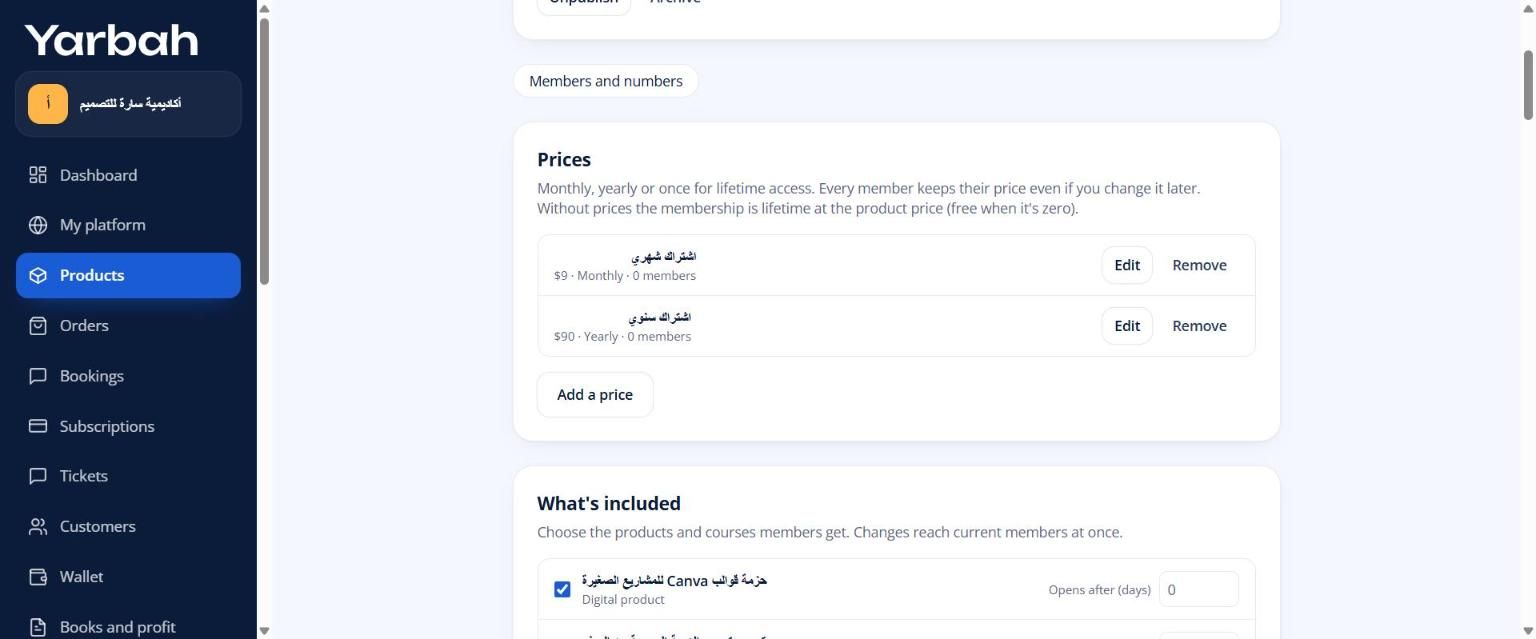
- The lowest recurring price is $1. Your page shows the lowest price.
- Every member keeps their price even if you change it later, so you can raise the price for new members without worrying about current ones.
- Without prices, the membership is lifetime at the product price (free when it's zero).
What's included
- Changes reach current members at once: what you add opens for them, and what you remove closes.
- Opens after (days): 0 means at once. For example, 30 means members get it a month after they join. Good for rewarding members who stay.
- Products delivered as a Service by your team can't be added, because each service needs details and work for every buyer. Delivery methods.
Trial and pause
- Free trial days: 0 for no trial. One trial per buyer; after it they pay to continue. Members get a reminder before the trial ends.
- Let members pause: payments and access stop at the end of the period, then come back automatically. Set the Longest pause (months). Pausing keeps a member who would otherwise cancel.
What if a renewal fails?
Yarbah tries the payment again after 1, 3 and 5 days, and the member is emailed to update their card. Access stays open during the grace period (7 days), then closes until they pay.
Tracking subscriptions
Open Subscriptions in the side menu:
- Monthly recurring revenue, Active members, and how many are on trial or lifetime.
- Churn (30 days): who left and who joined.
- Installments still to collect for installment plans.
- A filterable list: Running, On trial, Active, Past due, Paused and Ended.
What do members see?
In My library → My subscriptions: their status (Active, Free trial, Payment due or Paused), the next payment date, and buttons to pause, cancel or change the card. Cancelling stops renewal, and access stays until the end of the paid period.
Messages you may see
- Add a published product or course to the membership before publishing it.
- Memberships are switched off by Yarbah for now. New memberships can't be published or sold until they're back.
Updated 19 November 2026